Wednesday, September 15, 2010

30+ Awesome Free and Open Source Audio Applications List

Open Source community has great Audio Applications. We had featured 20 Audio Editors. Here is a best of the Audio Applications list that has, Audio Editors, Audio Sequencers, Stream Rippers, CD Rippers and much more. This list is constantly updated and comments, additions are most welcome. Thanks for commenting and helping us to grow the list.

image


Amarok – Rediscover music

Amarok is a powerful music player for Linux and Unix, MacOS X and Windows with an intuitive interface. It makes playing the music you love and discovering new music easier than ever before - and it looks good doing it!

image

Ardour – Digital Audio Workstation

Record Audio, Mix, Edit and Collaborate. One of the Ultimate Audio Editing software for Mac OS X and Linux.

image

Audacity - The Free, Cross-Platform Sound Editor

Audacity® is free, open source software for recording and editing sounds. It is available for Mac OS X, Microsoft Windows, GNU/Linux, and other operating systems.

image

Banshee – Music Player

Play your music and videos. Stay entertained and up to date with podcasts and video podcasts.  Sync your G1 phone, iPod, and other devices. We think you’ll love the new Banshee! Banshee is written in C# on the Mono platform using GNOME technologies (Gtk#, GStreamer, etc).

image

CDEx – Audio CD Extractor

CDEx is a very popular Open Source Digital Audio CD Extractor with more than 38 million downloads.

image

Grip – CD Ripper/CD Player

Grip is a cd-player and cd-ripper for the Gnome desktop. It has the ripping capabilities of cdparanoia built-in, but can also use external rippers (such as cdda2wav). It also provides an automated frontend for MP3 (and other audio format) encoders, letting you take a disc and transform it easily straight into MP3s. Internet disc lookups are supported for retrieving track information from disc database servers.Grip works with DigitalDJ to provide a unified “computerized” version of your music collection.

image image

Hydrogen – Advanced Drum Machine For GNU/Linux

Hydrogen is an advanced drum machine for GNU/Linux. It’s main goal is to bring professional yet simple and intuitive pattern-based drum programming.

image

Jokosher – Multi-Track Audio Studio

Jokosher is a simple yet powerful multi-track studio. With it you can create and record music, podcasts and more, all from an integrated simple environment.

image

LMMS – Linux Multimedia Studio

LMMS is a free cross-platform alternative to commercial programs like FL Studio®, which allow you to produce music with your computer. This includes the creation of melodies and beats, the synthesis and mixing of sounds, and arranging of samples. You can have fun with your MIDI-keyboard and much more; all in a user-friendly and modern interface.

image

MuseScore - Free music composition & notation software

MuseScore is a free cross platform WYSIWYG music notation program, licensed under GNU GPL.

 image image 

MusikCube – Fast, Lightweight Music management

musikCube is an mp3 player for the modern generation. It helps you just listen to what you want to hear, while offering innovative features not seen elsewhere. For the
technical user, musikCube is based on an embedded SQL database engine known as sqlite. For the non technical user, that means its fast. Really fast. “Dynamic playlists” allow fully automatic, randomized playback of songs based on your observed listening habits. The more you listen, the smarter it gets. It also features browsable, user sortable playlists.

image

MusE – Audio Sequencer

MusE is a MIDI/Audio sequencer with recording and editing capabilities written originally by Werner Schweer now developed and maintained by the MusE development team. MusE aims to be a complete multitrack virtual studio for Linux, it is published under the GNU General Public License.

image

Rosegarden – Audio Sequencer

Rosegarden is a well-rounded audio and MIDI sequencer, score editor, and general-purpose music composition and editing environment. Rosegarden is an easy-to-learn, attractive application that runs on Linux, ideal for composers, musicians, music students, and small studio or home recording environments.

image

Songbird – Manage Your Music

Click, Download and Start listening to your music in an organized way. Very simple, useful Audio Player. It is an alternative to Apple’s iTunes.

image

SoundKonverter – KDE Sound Application

soundKonverter is a frontend to various audio converters. The key features are:
- Audio conversion
- Replay Gain calculation
- CD ripping

image

StreamRipper – Internet Radio Recorder

StreamRipper is an Open Source (GPL) application that lets you record streaming mp3 to your hard drive. There is an alternative Open Source Stream Recording software – StreamHijacker.

image

WinLAME – Audio Encoder (Windows)

winLAME is an encoder for several audio formats, including mp3 (MPEG Layer 3), Ogg Vorbis and more. winLAME lets you set up the encoding process with an easy-to-use wizard-style user interface.

image


Updated List


Breakage – Intelligent Drum Machine

Breakage is an intelligent drum machine designed to make it easy and fun to play complex, live breakbeat performances. A step-sequencer pattern editor and previewer, database, sample browser, neural network, pattern morphs, statistics and probabilistic pattern generator give you the tools to work with breaks on a higher level than ever before.

image

Bristol – Synthesiser Emulation On Linux


image

BpmDJ – DJ Tools For Linux

BpmDJ is a tool to do DJ on Linux, plays MP3s and Ogg’s.

image

DJPlay – DJ App for Linux

DJPlay aims to be a high class live DJing application for Linux.

image

Exaile – Play It, Enjoy It

Exaile is a music manager and player for GTK+ written in Python. It incorporates automatic fetching of album art, lyrics fetching, Last.fm scrobbling, support for many portable media players, internet radio such as shoutcast, and tabbed playlists.

image

FluidSynth – Real-Time Software Synthesizer

FluidSynth is a real-time software synthesizer based on the SoundFont 2 specifications.

qsynth-macosx-800x196

Helix Player – Media Player For Linux

The Helix Player is an open source media player for Linux, Solaris, and Symbian based on the Helix DNA Client media engine. More operating system versions are currently in development.

Jack – Audio Connection kit

JACK is system for handling real-time, low latency audio (and MIDI). It runs on GNU/Linux, Solaris, FreeBSD, OS X and Windows (and can be ported to other POSIX-conformant platforms). It can connect a number of different applications to an audio device, as well as allowing them to share audio between themselves. Its clients can run in their own processes (ie. as normal applications), or can they can run within the JACK server (ie. as a “plugin”). JACK also has support for distributing audio processing across a network, both fast & reliable LANs as well as slower, less reliable WANs.

JAMin – Professional Audio Mastering

JAMin is the JACK Audio Connection Kit (JACK) Audio Mastering interface. JAMin is an open source application designed to perform professional audio mastering of stereo input streams. It uses LADSPA for digital signal processing (DSP). JAMin is licensed under the GPL.

image

LilyPond – Music Notation For Everyone

LilyPond prints music in the best traditions of classical engraving with minimum fuss. Don’t waste time on tuning spacing, moving around symbols, or shaping slurs. Impress friends and colleagues with sharp sheet music!

image

LinuxSampler – Audio Sampler

LinuxSampler is a free, streaming capable open source pure software audio sampler with professional grade features, comparable to both hardware and commercial Windows/Mac software samplers and to introduce new features not yet available by any other sampler in the world.

image

Mixxx – Beatmix, better

Mixxx is free, open source DJ software that gives you everything you need to perform live mixes.

image

MPD – Server Side Application For Playing Music

Music Player Daemon (MPD) is a flexible, powerful, server-side application for playing music. Through plugins and libraries it can play a variety of sound files while being controlled by its network protocol. MPD has lots of clients such as Sonata, LnkMusic, MPCool, Ario etc. Check out Clients section here.

RhythmBox – Inspired By iTunes

Rhythmbox is an integrated music management application, originally inspired by Apple’s iTunes. It is free software, designed to work well under the GNOME Desktop, and based on the powerful GStreamer media framework.

image

Sonic Visualiser – Audio Visualiser

Sonic Visualiser is an application for viewing and analysing the contents of music audio files.

image

TerminatorX – Real-Time Audio Synthesizer

TerminatorX is a real-time audio synthesizer that allows you to “scratch” on digitally sampled audio data (*.wav, *.au, *.ogg, *.mp3, etc.) the way hiphop-DJs scratch on vinyl records. It features multiple turntables, real-time effects (built-in as well as LADSPA plug-in effects), a sequencer and MIDI interface - all accessible through an easy-to-use gtk+ GUI. This software is designed to run under Linux, FreeBSD and the like.

image


Monday, September 13, 2010

Ipod Touch 4G torn down, only 256MB RAM found

iFixit has finally gotten their hands on the new iPod Touch and did their customary “teardown” to take a look inside the device. A couple of interesting things were found, sort of letdown in my opinion.

When they got into the 1GHz A4 processor, they found that the model is identical to the one used on the iPad and not the iPhone 4. What this means it that just like the iPad, the new iPod Touch only has 256MB RAM and not 512MB as most people initially believed.

ipodtoucha4processor

Another thing to point out is with regards to the Retina Display. The iPod Touch 4G has the same resolution as that of the iPhone 4. However, it lacks the In-Plane Switching (IPS) technology that’s available on the iPad and iPhone 4.

ipodtouch4gdisplay

The IPS gives these devices a wide-viewing angle of up to 178 degrees and the new Touch doesn’t have it. This might result to less than stellar viewing on games requiring you to tilt the iPod.

These and the poor camera that you may have already heard about makes the iPod Touch 4G a bit of a letdown for me despite the initial hoopla. But it won’t stop me from getting one.

Check out the interesting step-by-step teardown did by iFixit. It’s really interesting.

source: PinoyTechBlog


Seven Steps to Better SIP Security with Asterisk

In case any of you were wondering why there has been a fairly notable upswing in the attacks happening on SIP endpoints, the answer is “script kiddies.”  In the last few months, a number of new tools have made it easy for knuckle-draggers to attack and defraud SIP endpoints, Asterisk-based systems included.  There are easily-available tools that scan networks looking for SIP hosts, and then scan hosts looking for valid extensions, and then scan valid extensions looking for passwords.  You can take steps, NOW, to eliminate many of these problems.  I think the community is interested in coming up with an integrated Asterisk-based solution that is much wider in scope for dynamic protection (community-shared blacklists is the current thinking) but that doesn’t mean you should wait for some new tool to defend your systems.  You can IMMEDIATELY take fairly common-sense measures to protect your Asterisk server from the bulk of the scans and attacks that are on the increase. The methods and tools for protection already exists – just apply them, and you’ll be able to sleep more soundly at night.
 

Seven Easy Steps to Better SIP Security on Asterisk:
 

1) Don’t accept SIP authentication requests from all IP addresses.  Use the “permit=” and “deny=” lines in sip.conf to only allow a reasonable subset of IP addresess to reach each listed extension/user in your sip.conf file.  Even if you accept inbound calls from “anywhere” (via [default]) don’t let those users reach authenticated elements!
 

2) Set “alwaysauthreject=yes” in your sip.conf file.  This option has been around for a while (since 1.2?) but the default is “no”, which allows extension information leakage.  Setting this to “yes” will reject bad authentication requests on valid usernames with the same rejection information as with invalid usernames, denying remote attackers the ability to detect existing extensions with brute-force guessing attacks.
 

3) Use STRONG passwords for SIP entities.  This is probably the most important step you can take.  Don’t just concatenate two words together and suffix it with “1″ – if you’ve seen how sophisticated the tools are that guess passwords, you’d understand that trivial obfuscation like that is a minor hinderance to a modern CPU.  Use symbols, numbers, and a mix of upper and lowercase letters at least 12 digits long.
 

4) Block your AMI manager ports.  Use “permit=” and “deny=” lines in manager.conf to reduce inbound connections to known hosts only.  Use strong passwords here, again at least 12 characters with a complex mix of symbols, numbers, and letters.
 

5) Allow only one or two calls at a time per SIP entity, where possible.  At the worst, limiting your exposure to toll fraud is a wise thing to do.  This also limits your exposure when legitimate password holders on your system lose control of their passphrase – writing it on the bottom of the SIP phone, for instance, which I’ve seen.
 

6) Make your SIP usernames different than your extensions.  While it is convenient to have extension “1234″ map to SIP entry “1234″ which is also SIP user “1234″, this is an easy target for attackers to guess SIP authentication names.  Use the MAC address of the device, or some sort of combination of a common phrase + extension MD5 hash (example: from a shell prompt, try “md5 -s ThePassword5000″)
 

7) Ensure your [default] context is secure.  Don’t allow unauthenticated callers to reach any contexts that allow toll calls.  Permit only a limited number of active calls through your default context (use the “GROUP” function as a counter.)  Prohibit unauthenticated calls entirely (if you don’t want them) by setting “allowguest=no” in the [general] part of sip.conf.
 

These 7 basics will protect most people, but there are certainly other steps you can take that are more complex and reactive.  Here is a fail2ban recipe which might allow you to ban endpoints based on volume of requests.  There is discussion on the asterisk-user and asterisk-dev mailing lists of incorporating this type of functionality into Asterisk – let’s hear your ideas!
 

If you’d like to see an example of the tools that you’re up against, see this demo video of an automated attack tool that does scan, guess, and crack methods via a click-and-drool interface.
 
In summary: basic security measures will protect you against the vast majority of SIP-based brute-force attacks.  Most of the SIP attackers are fools with tools – they are opportunists who see an easy way to defraud people who have not considered the costs of insecure methods.  Asterisk has some methods to prevent the most obvious attacks from succeeding at the network level, but the most effective method of protection are the administrative issues of password robustness and username obscurity. 

source: Digium

Wednesday, October 28, 2009

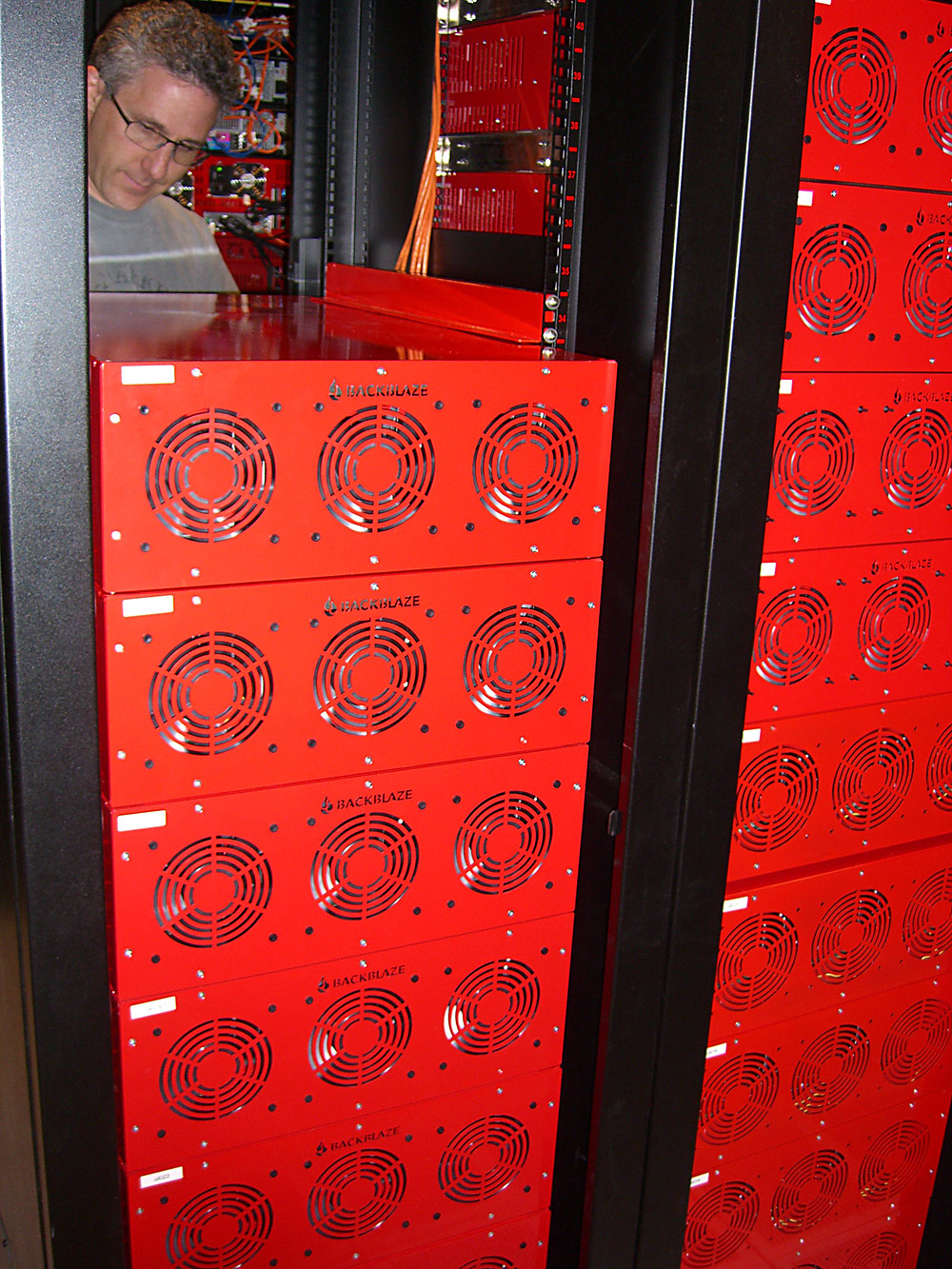
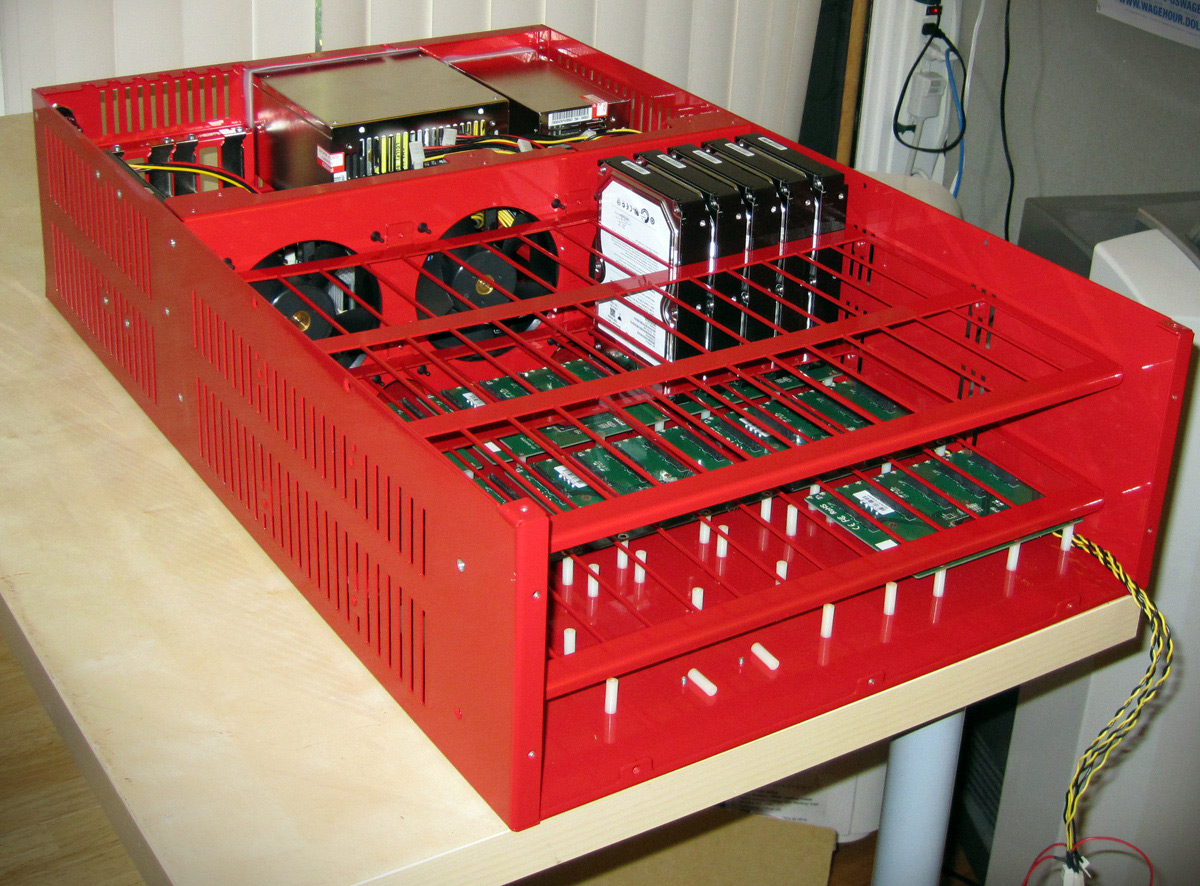
Petabytes on a Budget

Petabytes on a budget:
How to build cheap cloud storage


Tuesday, October 13, 2009

How to join Ubuntu 8.04 to Windows Active Directory (Domain)

These days many more companies are using mixed IT enviroments using a mixture of Windows, Linux, UNIX and Mac’s and I for one am using a mixture of Microsoft Windows and Linux (Ubuntu). On my network I use a Microsoft Active Directory and want to be able to get all Server (Linux & Windows) as well as Desktops (Linux and Windows) to authenticate in a central location.

Since browsing the web I managed to find this cool package that can be installed on Ubuntu Hardy Heron (8.04) which enables you to add and authenticate Ubuntu 8.04 against a Windows Domain Controller (Microsoft Active Directory)

So here goes…

sudo apt-get update
sudo apt-get install likewise-open
sudo domainjoin-cli join fqdn.of.your.domain Administrator
sudo update-rc.d likewise-open defaults
sudo /etc/init.d/likewise-open start

Using the above commands you have installed ‘likewise-open’ which is the package that makes it possible for the Ubuntu client/server to logon to a Windows domain, added the client/server to the windows domain, updated the system services and then started the service.

Now that the LikeWise package has been installed you can now logoff (although I recommend full system reboot) and logon in this format:

DOMAIN\username

You need to ensure that you prefix the username with the Domain name.

The good points about this kind of setup is as follows:

  • Single username/password combination across entire network.
  • Enforces password policys
  • Likewise Open enables Linux, Unix and Mac authentication on a Microsoft network using Active Directory. A user can now interactively log in to the Linux, Unix or Mac machine using Active Directory credentials, and can access any kerberized services that the non-Windows machine hosts.


OpenDns | Speed Up your Internet Browsing

OpenDNS.com is free DNS service provider that offers help in building a safer, faster and smarter internet.

Website Outlook Price: $7.63 million


openDNS logo


OpenDNS was founded in July 2006 by David Ulevitch through a venture capital funding from Minor Ventures.

It has a variety of features in its system such as anti-phishing (through PhishTank), domain blocking, Recursive dns, Anycast routing, typo correction and advanced web content filtering.

It is powered by high speed and distributed network of Open DNS Server.

It provides protection from phising scams, malwares, unsolicited emails, and other unethical online practices without any DNS server download.

It is widely used in schools, major enterprises, companies and organizations worldwide to protect users from unwanted information access, provide tighter security and attain a faster browsing speed through an easy to configure dns server.

OpenDNS uses the two (2) IP addresses namely: 208.67.222.222and 208.67.222.220.

Corporate headquarter is located at 199 Fremont St, 12th Floor, San Francisco, California with CEO Nand Mulchandani.

In February 2009, OpenDNS and Kaspersky Lab Team fought against Massive Windows Conficker Worm (a.k.a. 'Downandup' or 'Kido') spreading in the internet.

OpenDNS.com was registered in September 04, 2003 through Directi Internet Solutions Pvt. Ltd. and a Google PageRank of 6.

It has a Forum, Blog, and Support Knowledge Base.

It is popular in the US, Turkey, India, Indonesia, Pakistan, Algeria, UK, Italy, China, Iran, Brazil, Germany, Canada, Philippines, Australia, and Russia.

Competitors are DNSStuff, and DynDNS.