Saturday, June 6, 2009

Project Natal for XBOX 360


Project Natal for XBOX 360

No Strings (or Controllers) Attached.

Introducing Project Natal, a revolutionary new way to play: no controller required.  See a ball? Kick it, hit it, trap it or catch it.  If you know how to move your hands, shake your hips or speak you and your friends can jump into the fun -- the only experience needed is life experience.


Credits: http://www.xbox.com/en-US/live/projectnatal/

Tuesday, June 2, 2009

Intel launches chips for low-cost, thin laptops


Intel is launching its line of processors for thin, inexpensive
laptops at the Computex tech conference in Taipei. Intel marketing
chief Sean Maloney talked about this in a phone interview.


Intel marketing chief Sean Maloney

Intel marketing chief Sean Maloney

(Credit: Intel)

"It's clear that people like devices to be thin and light," said
Maloney, who was speaking from the Computex conference in Taipei where
he will be giving a keynote on Tuesday.


"We've really taken that to heart and come out with a complete
top-to-bottom range of microprocessors that enable radically longer
battery life and much smaller designs," said Maloney, referring to
Intel's new lineup of consumer ultra-low-voltage (CULV) processors.


Maloney continued. "There are a lot of computers being announced
here (Computex) that look like conventional notebooks in terms of how
wide the screens are, but they're super-thin, the performance is very
good, and they get up to nine hours battery life without a big, fat
battery at the back," he said.


MSI X340 X-Slim laptop is one of the first CULV laptops

MSI X340 X-Slim laptop is one of the first CULV laptops

(Credit: MSI)

"It's a big change for industry. It means the technology weaves its
way into your life more because you're going to have all-day
notebooks," Maloney said.


The new processors will encompass the Core 2, Pentium, and Celeron processor architectures, according to Maloney.


Prices for these new laptops will start at $399 and range up to $2,000 in some cases, Maloney said.


And will laptops based on these chips impact the sales of Netbooks?
"I don't think so," Maloney said, but added: "It's a loser mentality to
not develop one segment because you're worried about the other."


Maloney continued. "The demographics (for Netbooks) that's
completely untouched is kids between the ages of 7 and 12. So, the
Netbook market is still at a very early stage," he said.


In addition, Intel unveiled the Mobile Intel GS40 Express Chipset
for the new ULV-based laptops. This "value" chipset enables ULV-based
laptops to support HD (high-definition) playback,
Windows Vista Premium support and native support for integrated HDMI (High-Definition Multimedia Interface).


Wireles options will include embedded WiMAX or Intel "My Wi-Fi"
technology. My Wi-Fi transforms a laptop into a WiFi personal area
network, connecting directly with up to eight Wi-Fi-certified devices,
according to Intel.

Though a crush of new thin laptops are expected, the MSI X340
is one of the first. The X340 has a 13.4-inch screen, weighs 2.86
pounds, and measures .78 inches thick.

Credits: News.Com


Monday, June 1, 2009

MSI Wind Top AE1900


MSI's Cheap Desktop Suffers From Performance Anxiety


After
a few grim years ceded to the iMac, PC-based all-in-one desktops are
making an LL Cool J-esque comeback. Their next move: Make the switch
from semi-luxe gear designed for highly-aesthetic environments to the
mega-cheap world that the netbook has built.


MSI, creators of the popular Wind netbook line, actually has its
toes in both worlds with the Wind Top AE1900, which combines a somewhat
Mac-like, white-and-clear design with an ultra-cheap $589 price tag.


Specs look exceedingly promising at first: 250GB of hard drive
space, 2GB of RAM, integrated Wi-Fi, DVD burner, an SD card slot, and a
very bright 19-inch touchscreen display. If nothing else, it's one of
the best-looking touchscreens (non-capacitive; a stylus works better
than your finger) we've seen at this screen size. Windows Vista Basic
is preinstalled, and MSI also tosses a finger-friendly
program-launching skin on top of that. (It's easy to get from the skin
to Vista and back.)


But the Achilles' heel of the Wind Top is its baffling choice of an
Atom 330 processor to power these guts. Although the dual-core 330 is
known as the "fast" version of the Atom (it draws 8 watts instead of
the 2.5 watts used by the netbook standard Atom N270 and has double the
L2 cache), it's still woefully inadequate for a computer this
ambitious. The Wind Top AE1900 struggles with just about any task you
throw at it, from starting up to launching anything more complex than
Notepad. Benchmarks are rock bottom -- on par with actual netbooks --
and those otherwise impressive specs make you long for something far
snappier.


Even in environments where performance isn't a concern -- a kid's
room or the kitchen, both spots where you might actually put the Wind
Top -- the lengthy lag times are going to get frustrating. I frequently
found myself tapping an app to open it, assuming I hadn't clicked quite
right, and clicking it again a few more times, only to have the same
application launch itself five times in a row over the next few
minutes. Now try to imagine how frustrating that would be when you're
trying to get Disney.com open for a screaming toddler.


Advice to MSI: Drop in the cheapest Core 2 Duo CPU in lieu of the
most expensive Atom here and you'll have yourselves a real winner.


WIRED Amazingly affordable and loaded to the gills.
Touchscreen makes this a perfect kiddie computer. Slim profile lets it
fit just about anywhere. Cuter than a box of puppies.


TIRED Performance problems dog the user at every
turn. Flashing blue hard-drive activity light is front and center,
terribly distracting and impossible to cover up. Bundled keyboard and
mouse are beyond cheap. Webcam aim can't be adjusted.


  • Style:

    All-in-one

  • RAM size:

    2GB and under

  • Hard Drive Size:

    200GB to 299GB
  • Manufacturer: MSI


  • Price: $589 (as tested)

Credits: wired.com

Thursday, May 28, 2009

Homebrewed CPU Is a Beautiful Mess of Wires


Intel’s fabrication plants can churn out hundreds of thousands of
processor chips a day. But what does it take to handcraft a single
8-bit CPU and a computer? Give or take 18 months, about $1,000 and
1,253 pieces of wire.


Steve Chamberlin, a Belmont, California, videogame developer by day,
set out on a quest to custom design and build his own 8-bit computer.
The homebrew CPU would be called Big Mess of Wires or BMOW. Despite its
name, it is a painstakingly created work of art.


“Computers can seem like complete black boxes. We understand what
they do, but not how they do it, really,” says Chamberlin. “When I was
finally able to mentally connect the dots all the way from the physics
of a transistor up to a functioning computer, it was an incredible
thrill.”


The 8-bit CPU and computer will be on display doing an interactive chess demo at the fourth annual Maker Faire
in San Mateo, California, this weekend, May 30-31. It will be one of
600 exhibits of do-it-yourself technology, hacks, mods and just plain
strange hobby projects at the faire, which is expected to draw 80,000
attendees.


The BMOW is closest in design to the MOS Technology 6502 processor used in the Apple II, Commodore 64 and early Atari videogame consoles. Chamberlin designed his CPU
to have three 8-bit data registers, a 24-bit address size and 12
addressing modes. It took him about a year and a half from design to
finish. Almost all the components come from the 1970s- and 1980s-era
technology.


“Old ’80s vintage parts may not be very powerful, but they’re easy
to work with and simple to understand,” he says. “They’re like the
Volkswagen Beetles of computer hardware. Nobody argues they’re the best
but we love them for their simplicity.”


To connect the parts, Chamberlin used wire wrapping instead of
soldering. The technique involves taking a hollow, screwdriver-shaped
tool and looping the wire through it to create a tight, secure
connection. Wire wraps
are seen as less prone to failures than soldered junctions but can take
much longer to accomplish. Still, they offer one big advantage, says
Chamberlin.


“Wire wrapping is changeable,” he says. “I can unwrap and start over
if I make a mistake. It is is much harder to recover from a mistake if
you solder.”


Chamberlin started with a a 12×7-inch Augat wire-wrap board with
2,832 gold wire-wrap posts that he purchased from eBay for $50.
Eventually he used 1,253 pieces of wire to create 2,506
individually-wrapped connections, wrapping at the rate of almost 25
wires in an hour. “It’s like a form of meditation,” he wrote on his
blog. “Despite how long it takes to wrap, the wire-wrapping hasn’t
really impacted my overall rate of progress. Design, debugging, and
general procrastination consume the most time.”


The BMOW isn’t just a CPU. Chamberlin added a keyboard input, an LCD
output that shows a strip of text, a USB connection, three-voice audio,
and VGA video output to turn it into a functioning computer. The video
circuitry, a UMC 70C171 color palette chip, was hard to come by, he
says. When Chamberlin couldn’t find a source for it online, he went to
a local electronics surplus warehouse and dug through a box of
20-year-old video cards. Two cards in there had the chip he needed, so
he took one and repurposed it for his project.


The use of retro technology and parts is essential for a home
hobbyist, says Chamberlin. Working with newer electronics technology
can be difficult because a lot of modern parts are surface-mount chips
instead of having through-hole pins. That requires a wave soldering
oven, putting them out of reach of non-professionals.


After months of the CPU sitting naked on his desk, Chamberlin fashioned a case using a gutted X Terminal, a workstation popular in the early 1990s.


“Why did I do all this?” he says. “I don’t know. But it has been a lot of fun.”


Check out Steve Chamberlin’s log of how BMOW was built.


Photo:  Wire wrapped 8-bit CPU/Steve Chamberlin


Credits: Wired.Com


Tuesday, April 28, 2009

Mozilla releases Firefox 3.5 beta

Mozilla on Monday released beta 3.5 of Firefox, a revamp of the open-source Web browser designed to include better performance, several new Web programming features, and a private browsing mode.

The earlier betas had been numbered 3.1, but Mozilla switched to the version 3.5 name after concluding the changes were more significant than it envisioned earlier. Mozilla has said earlier the fourth beta will the last, with more polished release candidates expected before the final version of Firefox 3.5 is released.

The software emerges amid what's become a fiercely competitive browser market. Microsoft has released a significant new version, Internet Explorer 8, while Google has entered the market with Chrome and Apple is trying to secure a Windows foothold for its Safari browser. Firefox holds second place in market share to IE.

Among the changes compared with the current Firefox 3.0.x versions are the faster TraceMonkey engine for running Web sites' JavaScript programs; built-in JSON (JavaScript Object Notation) technology for exchanging data between servers and browsers; support for tags to describe audio and video content the way images have been available for years; the private browsing mode for leaving no traces on your computer while surfing; support for technology to let permitted applications know the user's location; and support for the Web workers standard for letting a browser perform processing in the background without holding back a Web application's user interface.

There are a number of known problems with Gmail and with AVG SafeSearch v8.0 on Windows, and as usual, many of those extensions that are so popular on Firefox could break. For details, check the release notes.


Thursday, April 9, 2009

Conficker Hype Used by Rogue Gangs

As you're all aware Conficker has been in the news a lot lately, especially with regards to if anything will happen on April 1st or not. We found out that rogue security software folks have picked up on this. For example, let's have a look at remove-conficker.org, a domain which was registered today:


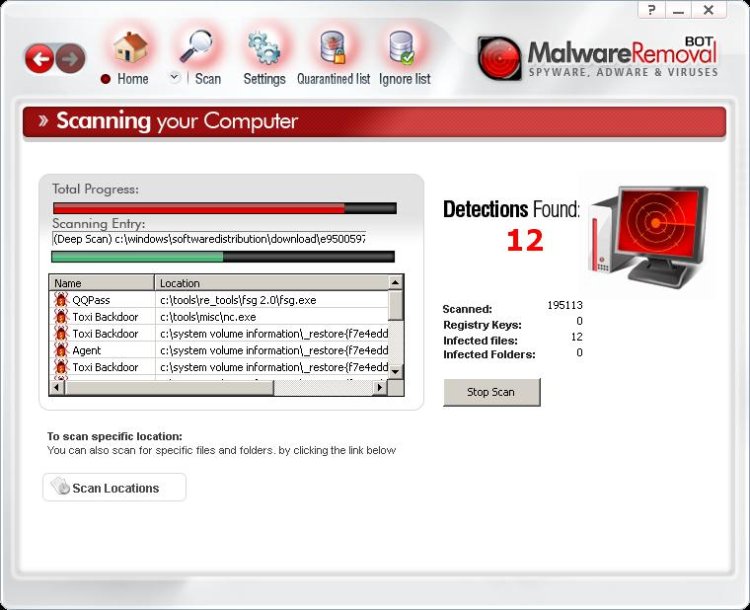
They advertise a tool called MalwareRemovalBot. It's fake. Interestingly, it doesn't always find non-existing malware infections on your PC — only sometimes. But one thing is for sure, it does not remove Conficker.C. We tried it and it didn't do a thing to remove it.

When it did find something that it claimed to be malware it looked like this:


And then it asked us to register and pay $39.95 for the removal functionality.


When following up on this we did a Google search for "remove conficker.c" and saw several purchased ads that lead to the same type of "security" software as well.


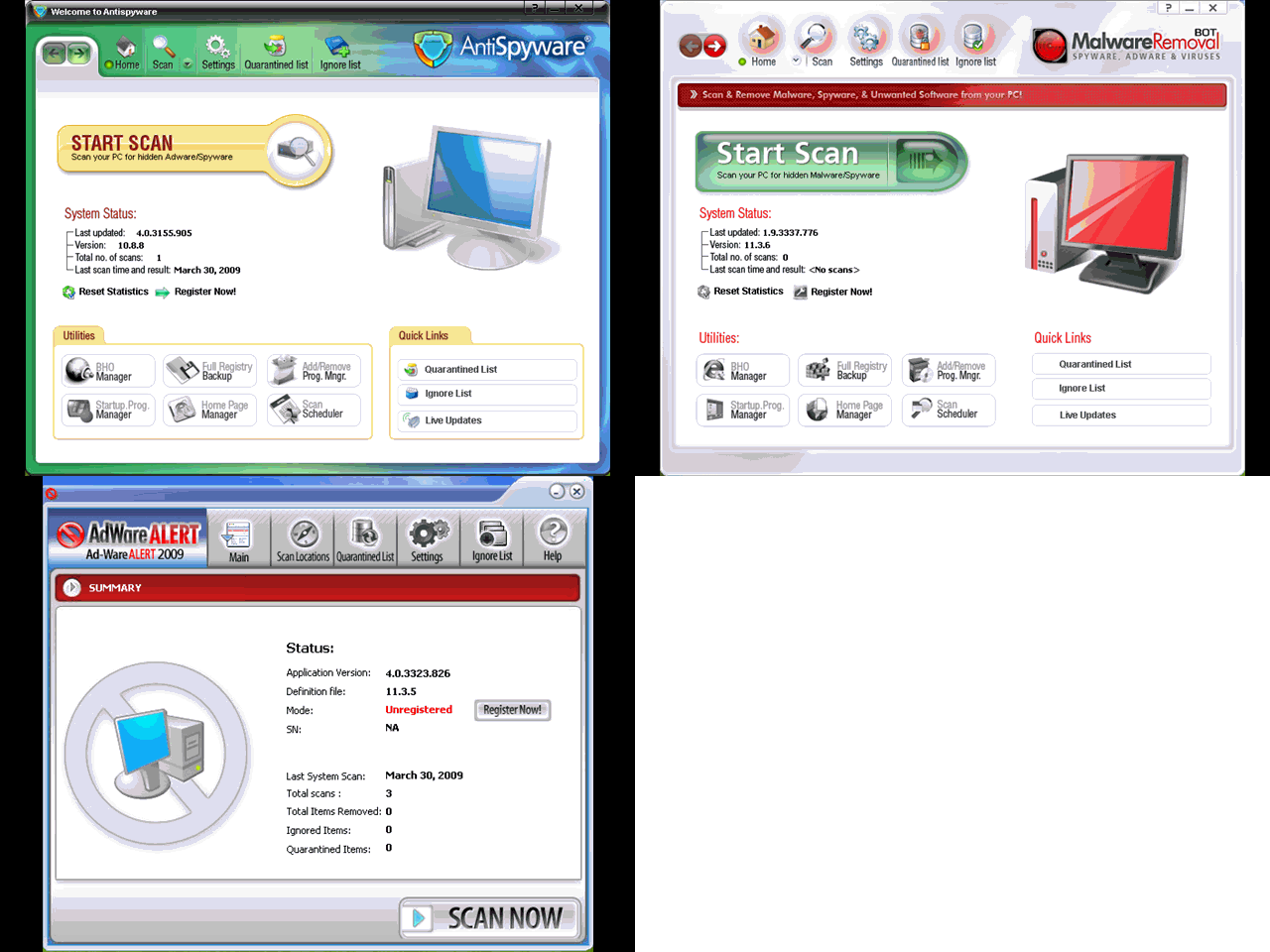
Like AdwareAlert and AntiSpy2009, it is clear that it's an affiliate program going on.


Get your facts from known sites and download your removal tools from respected companies. Such as ours which you can find here.